If you’ve been asking “How can I use AI as a personal trainer?” — this guide is your answer. Not theory. Not a list of generic tools. This is a step-by-step walkthrough showing you exactly how to use AI inside FirstRep to program workouts, grow your business, manage clients, and coach at scale. Every screenshot is from the actual app. Every workflow is something you can do today.
- The Trainer Time Problem (and How AI Fixes It)
- Build a Workout Program in 30 Seconds
- Generate Blog Posts & Social Content from Your Growth Tab
- Automate Client Follow-Ups with Rules
- Create Recipes That Hit Exact Macros
- Spot At-Risk Clients Before They Churn
- Build Your Website & Capture Leads on Autopilot
- Talk to “Rep” — Your AI That Actually Does Things
- Let Clients Book Themselves
- Ask Rep About Your Revenue (and Get Real Answers)
- Never Stare at a Blank Message Again
- Your First Week on FirstRep: Day-by-Day Plan
- Frequently Asked Questions
The Trainer Time Problem (and How AI Fixes It)
You didn’t become a personal trainer to spend 5 hours a week writing programs in spreadsheets, 3 hours creating Instagram posts, and another 2 hours chasing clients who forgot their check-in. But that’s the reality for most trainers managing 15–25 clients.
FirstRep was built to solve this. Every AI feature described in this guide is built directly into the app — no copy-pasting between tools, no separate subscriptions, no juggling 4 different platforms. You coach. AI handles the busywork.
Every AI feature in this guide — the workout builder, the coaching agent, the content generator, the recipe creator, the automation rules — is included on every FirstRep plan, including free (up to 3 clients). No add-ons, no feature gating, no “upgrade to unlock AI.”
Let’s walk through each one with real screenshots.
1. Build a Workout Program in 30 Seconds
Open the AI Builder from your trainer home screen. Type what you need:
In under 10 seconds, FirstRep generates a complete program — pulling exercises from a library of 1,734 real exercises with 3,418 multi-angle video demos. Not AI-hallucinated movements. Real exercises your client can follow with proper form videos.
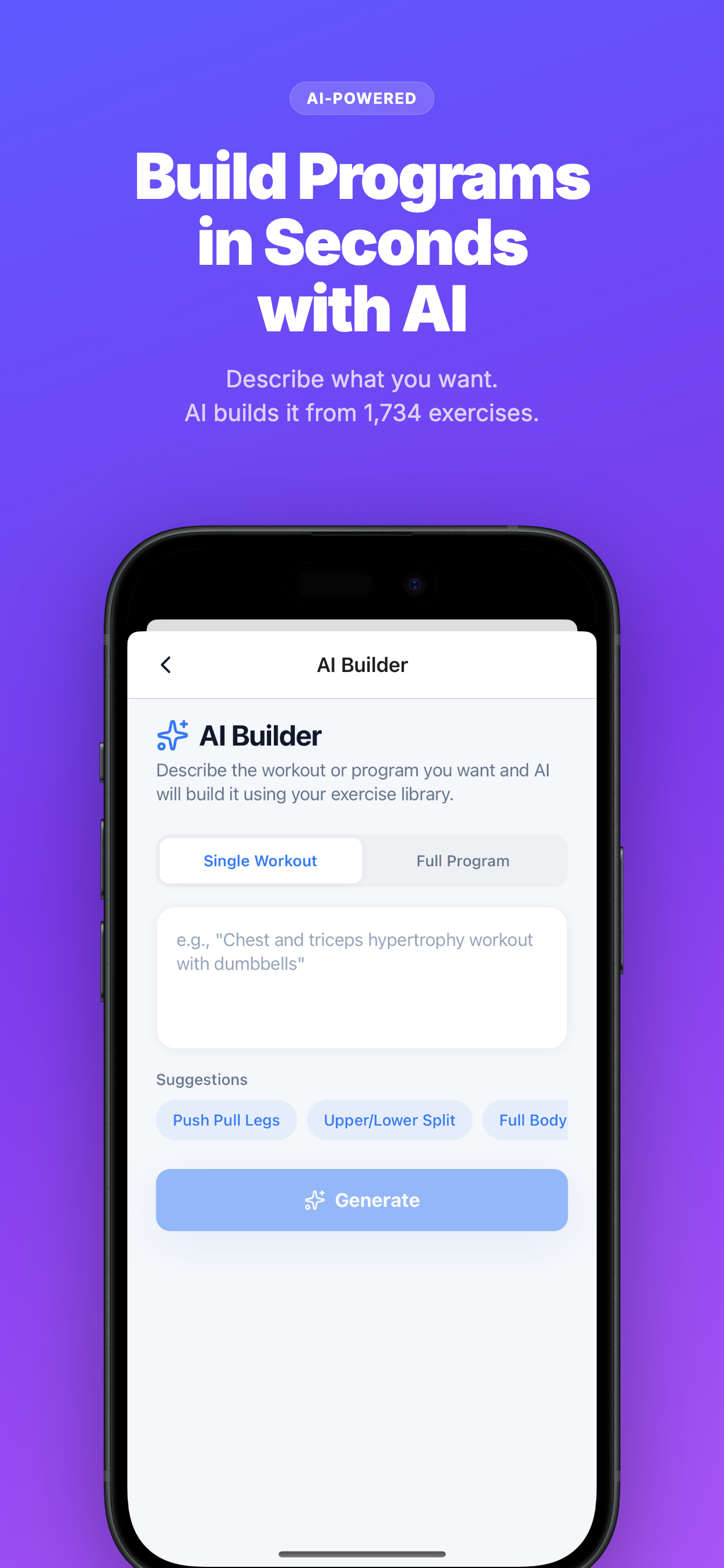
1. Tap the AI Builder icon on your home screen → 2. Describe the program (goal, split, equipment, level) → 3. Review the generated exercises, swap any you don’t like, adjust volume, and hit “Save & Assign.” The program is instantly delivered to your client with video demos for every exercise.
The AI knows about equipment brands too — BH Fitness, Life Fitness, Precor, Technogym — so if your client trains at a specific gym, the exercises match their available equipment.
Time saved: A program that used to take 45–60 minutes to build manually takes under 10 minutes including your review. For 10 clients, that’s 5–8 hours back every month. Deep dive: AI Workout Programming →
2. Generate Blog Posts & Social Content from Your Growth Tab
Most trainers quit content marketing after 2 weeks because writing posts and articles takes forever. FirstRep’s Growth tab puts your entire marketing department inside the app.
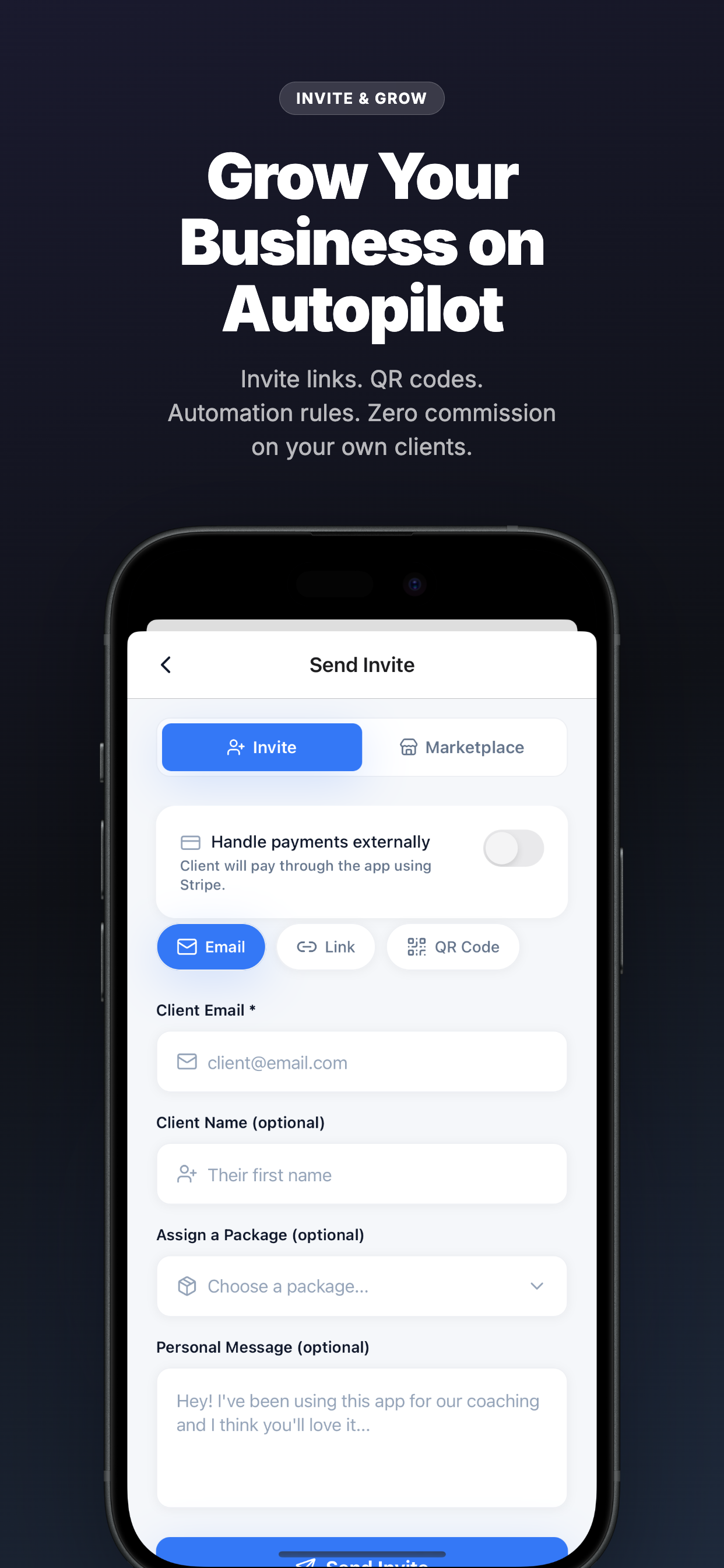
1. Go to Growth → Articles → New Article → 2. Enter your topic, target keyword, and tone → 3. AI generates a full 1,000–2,000 word article with your name, specialty, and location woven in → 4. Edit to add your personal experience → 5. Tap Publish. It goes live on your mini-website at firstrep.fit/@yourhandle.
For social content, same flow: pick a platform (Instagram, TikTok, LinkedIn), choose a format (carousel, reel script, caption, story), and the AI generates platform-optimized content with hashtags and hooks. You can even repurpose a published article into 3–5 social posts with one tap.
FirstRep also generates content automatically on a daily schedule — 1 social post per day and 1 article per week, all saved as drafts for your review. You wake up to a content queue ready to approve.
Time saved: From 0 content to 3+ posts per week without the grind. Deep dive: AI Content Creation →
3. Automate Client Follow-Ups with Rules
Set it once, it runs forever. FirstRep’s automation rules send the right message at the right time without you lifting a finger.
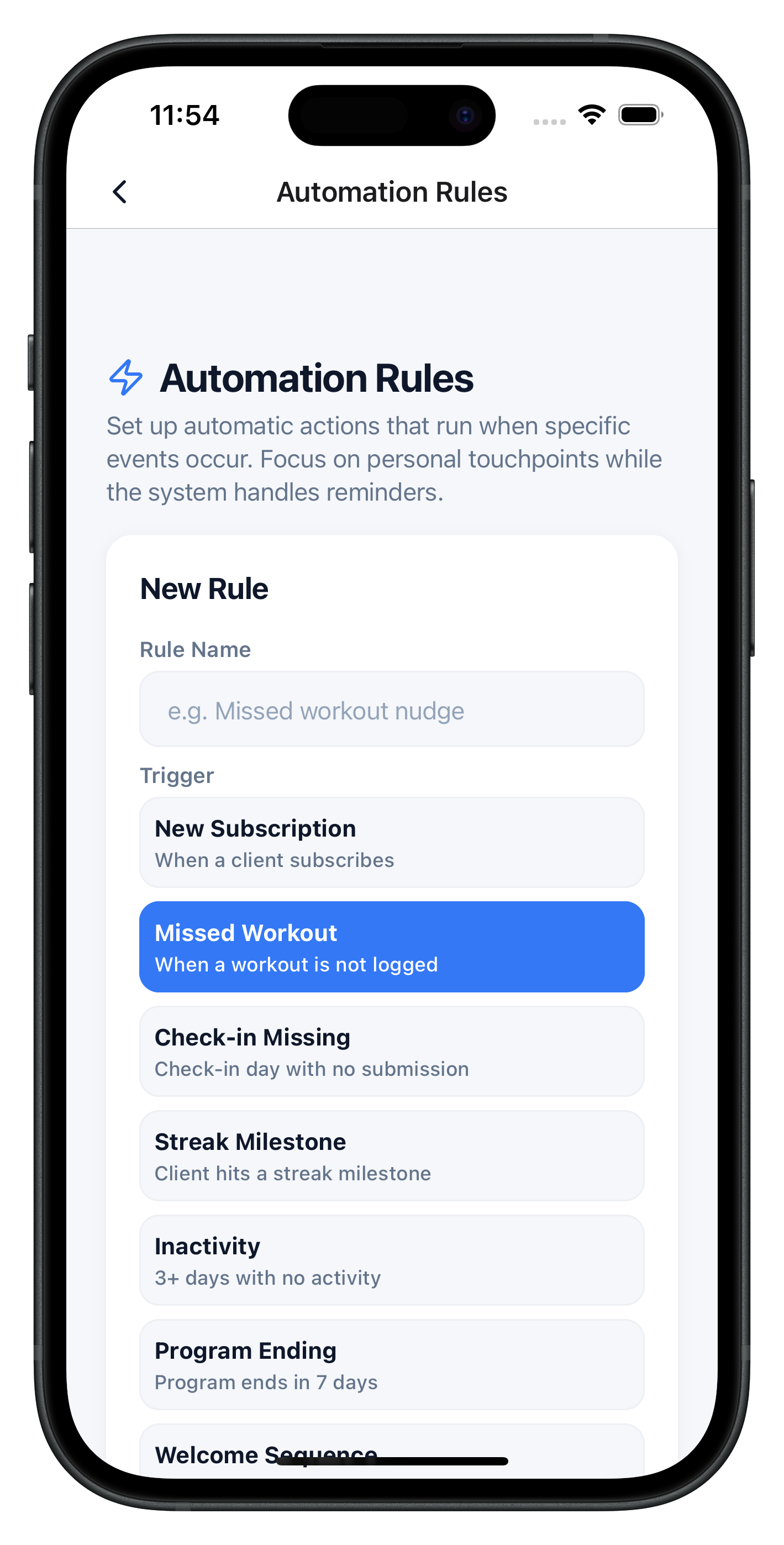
1. Missed workout follow-up (2 missed → send check-in) → 2. Weekly check-in reminder (24hr before deadline) → 3. Welcome message (new signup → onboarding instructions) → 4. PR celebration (new personal record detected → congratulations) → 5. Re-engagement nudge (7 days inactive → “Everything okay?” message).
You also get a “Needs Attention” dashboard that combines workout compliance, check-in rates, and app engagement into a risk score. Instead of checking 20 client profiles, you check one list and focus on whoever needs you most.
Deep dive: AI Client Management & Automation →
4. Create Recipes That Hit Exact Macros
Client needs a 500-calorie high-protein breakfast that’s gluten-free? Instead of Googling recipes and doing macro math, let AI generate it.
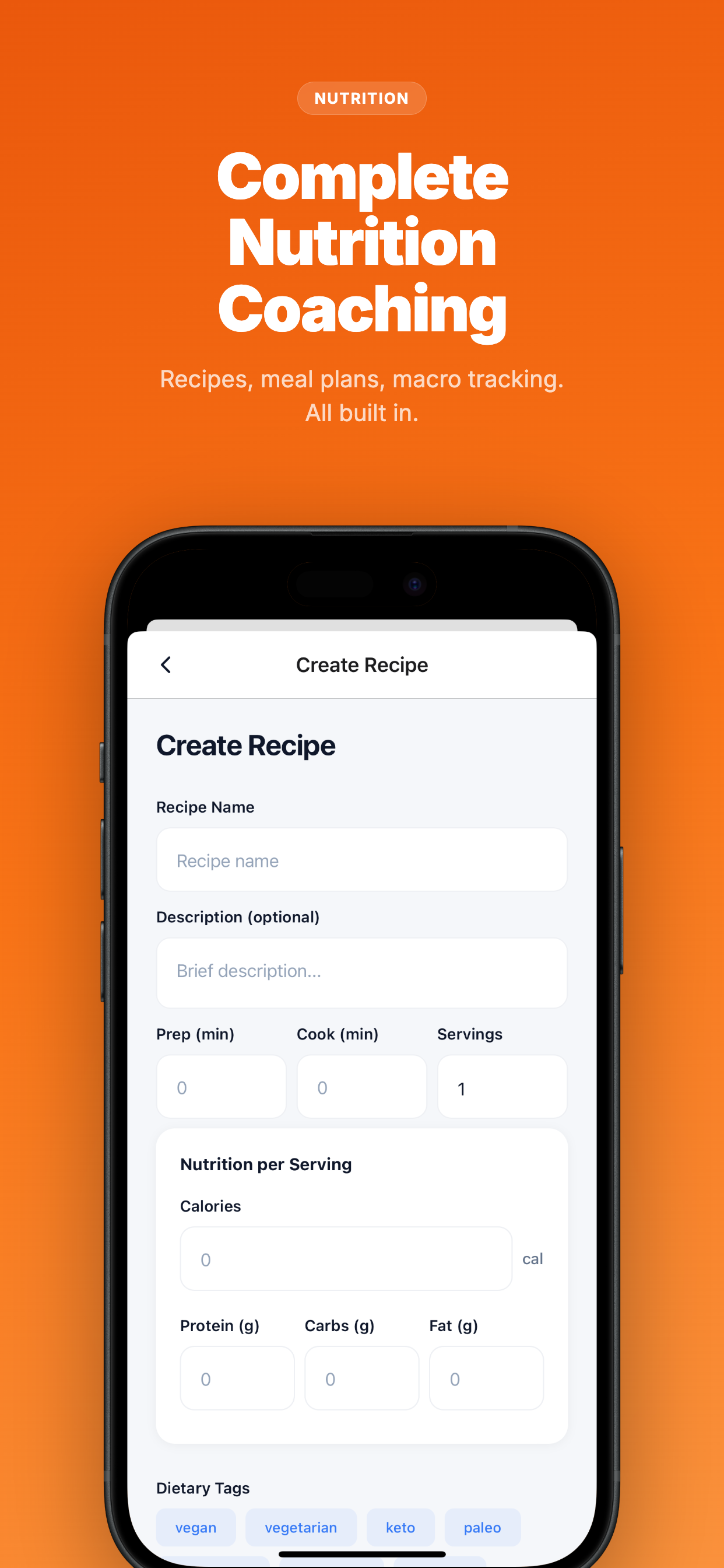
1. Go to Nutrition → Recipes → Generate with AI → 2. Enter: meal type (breakfast), target macros (500 cal, 40g protein, 45g carbs, 15g fat), dietary preference (gluten-free) → 3. AI generates a practical recipe with exact ingredient quantities, cooking steps, and prep time → 4. Save to your recipe library and add to client meal plans.
FirstRep also syncs nutrition data from Apple Health and Google Health Connect, pulling in calories and macros logged in apps like MyFitnessPal. So you see real adherence scores without clients manually double-entering data.
Deep dive: AI Nutrition Planning →
5. Spot At-Risk Clients Before They Churn
With 20 clients, you can’t track everyone’s engagement in your head. FirstRep does it for you.
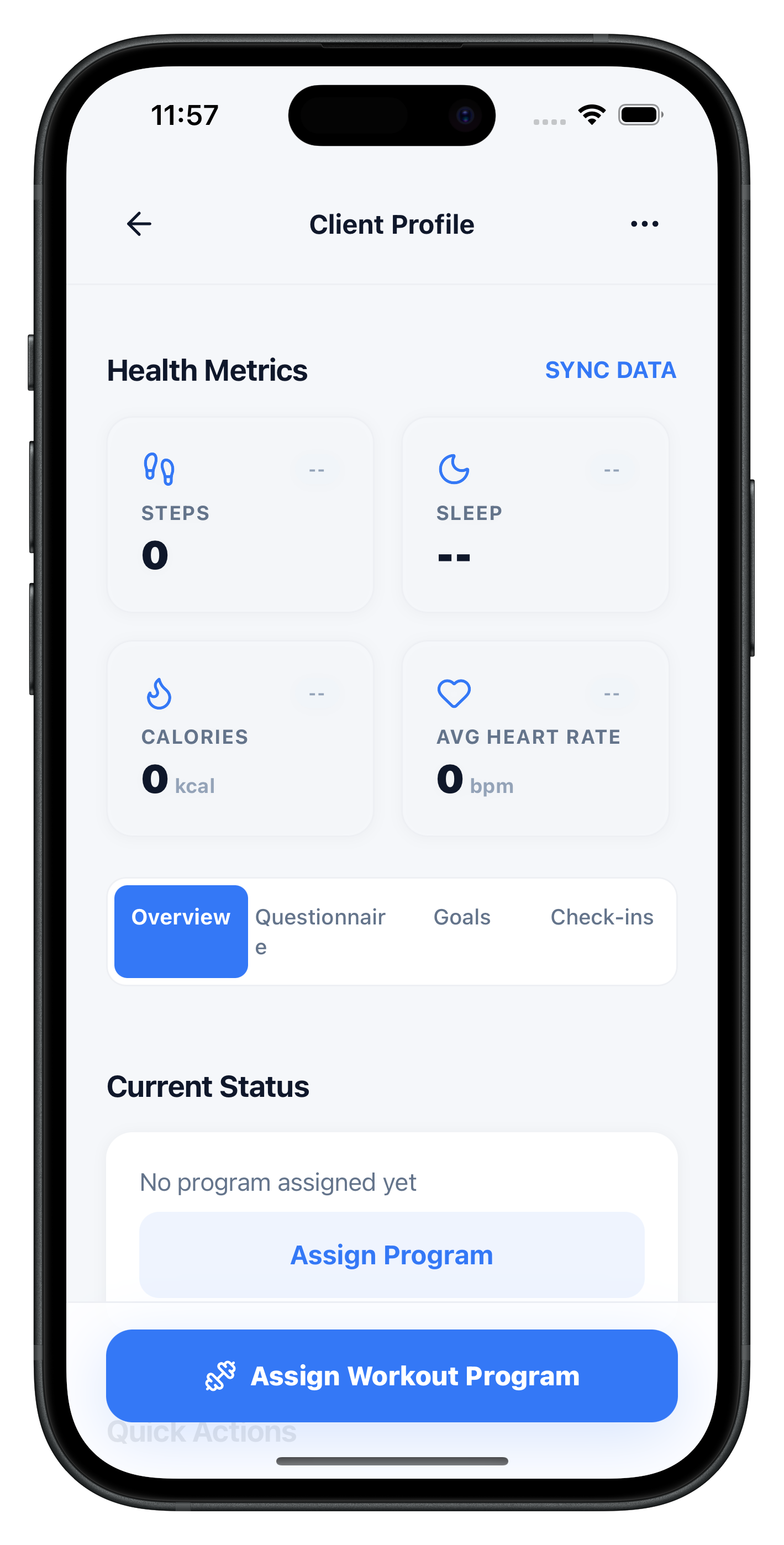
For every client, FirstRep automatically tracks:
- Workout completion rate — what % of assigned workouts they actually do
- Check-in submission rate — are they submitting weekly check-ins on time?
- Nutrition adherence — synced from health apps, are they hitting macro targets?
- Personal records — auto-detected after every workout log, celebrated automatically
- Risk score — declining engagement triggers a flag on your “Needs Attention” dashboard
You don’t review 20 dashboards. You review one list of clients who need a personal message from you right now.
6. Build Your Website & Capture Leads on Autopilot
No website? No problem. FirstRep gives every trainer a professional mini-website at firstrep.fit/@yourhandle. It auto-generates from your profile: bio, specialties, packages, reviews, and your AI-written blog posts.
1. Claim your handle in Growth → Website Settings → 2. Create a lead magnet (AI generates a PDF: workout guide, nutrition checklist, etc.) → 3. Visitors download the PDF in exchange for their email → 4. AI nurture sequence sends follow-up emails on Day 0, 3, and 7 → 5. Leads appear in your pipeline (New → Contacted → Qualified → Converted). All automatic.
Trainers using the Growth tab report that their mini-website + lead magnets bring in 3–5 qualified leads per month with zero ongoing effort after the initial setup.
7. Talk to “Rep” — Your AI That Actually Does Things
This is the feature that makes FirstRep fundamentally different from any other platform. Rep is not ChatGPT. Rep is an AI assistant connected to your real data that can execute real actions through conversation.
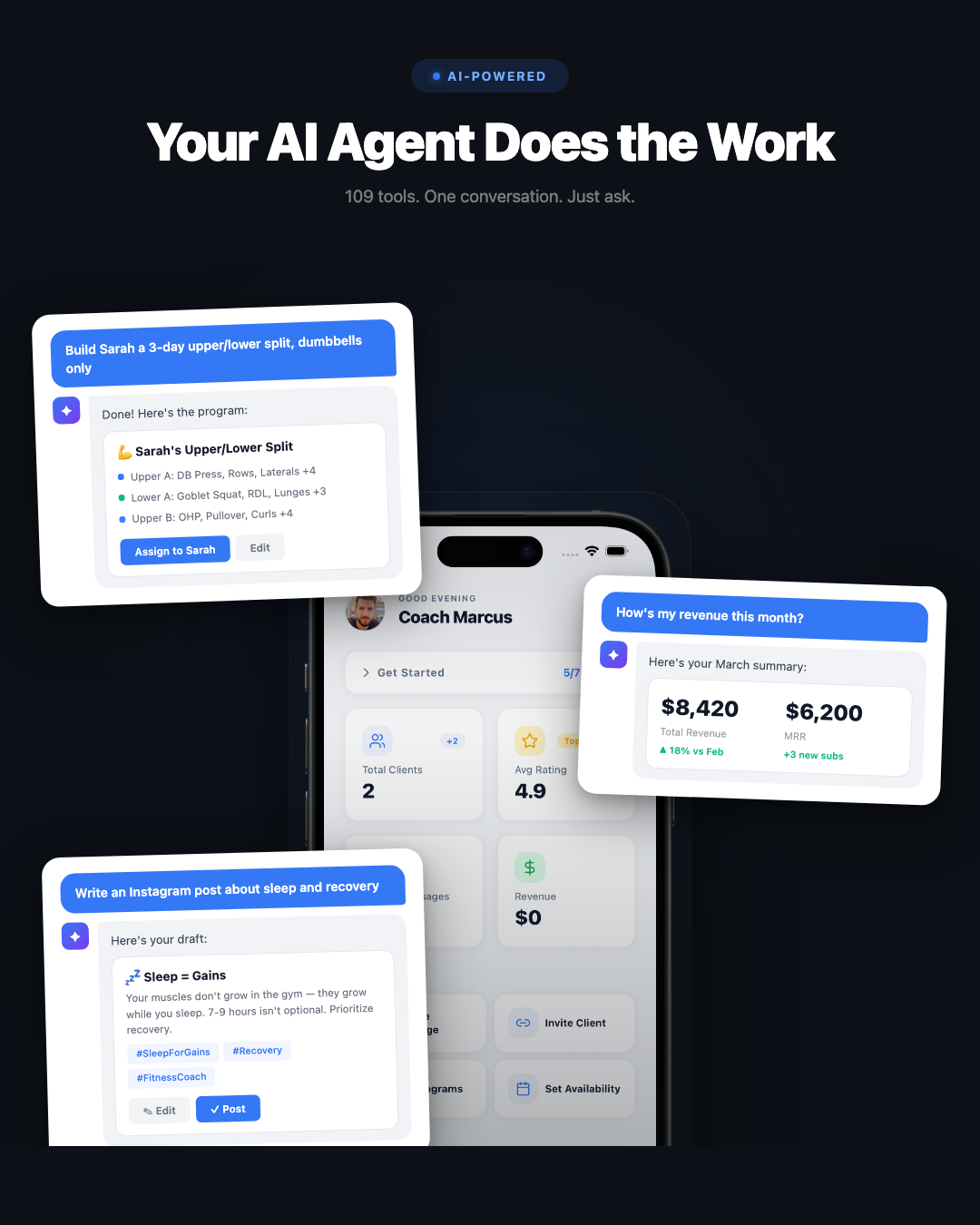
Things you can say to Rep right now
Rep queries your database and returns an interactive card with each overdue client. Tap a card to go straight to their profile.
Rep generates the program, shows you a preview card, and waits for your confirmation before assigning. You stay in control.
Rep pulls your real Stripe data and shows a stats card: marketplace revenue, direct client revenue, total MRR.
Rep generates a platform-optimized caption with hashtags. Copy it or save it to your content queue.
Rep identifies the clients, drafts the message, and asks for your confirmation before sending.
117 tools. 15 domains. Clients, coaching, workouts, nutrition, progress, scheduling, messaging, habits, growth, invitations, packages, forms, business analytics, and more. Rep requires your confirmation before any write action, so nothing happens without your approval.
8. Let Clients Book Themselves
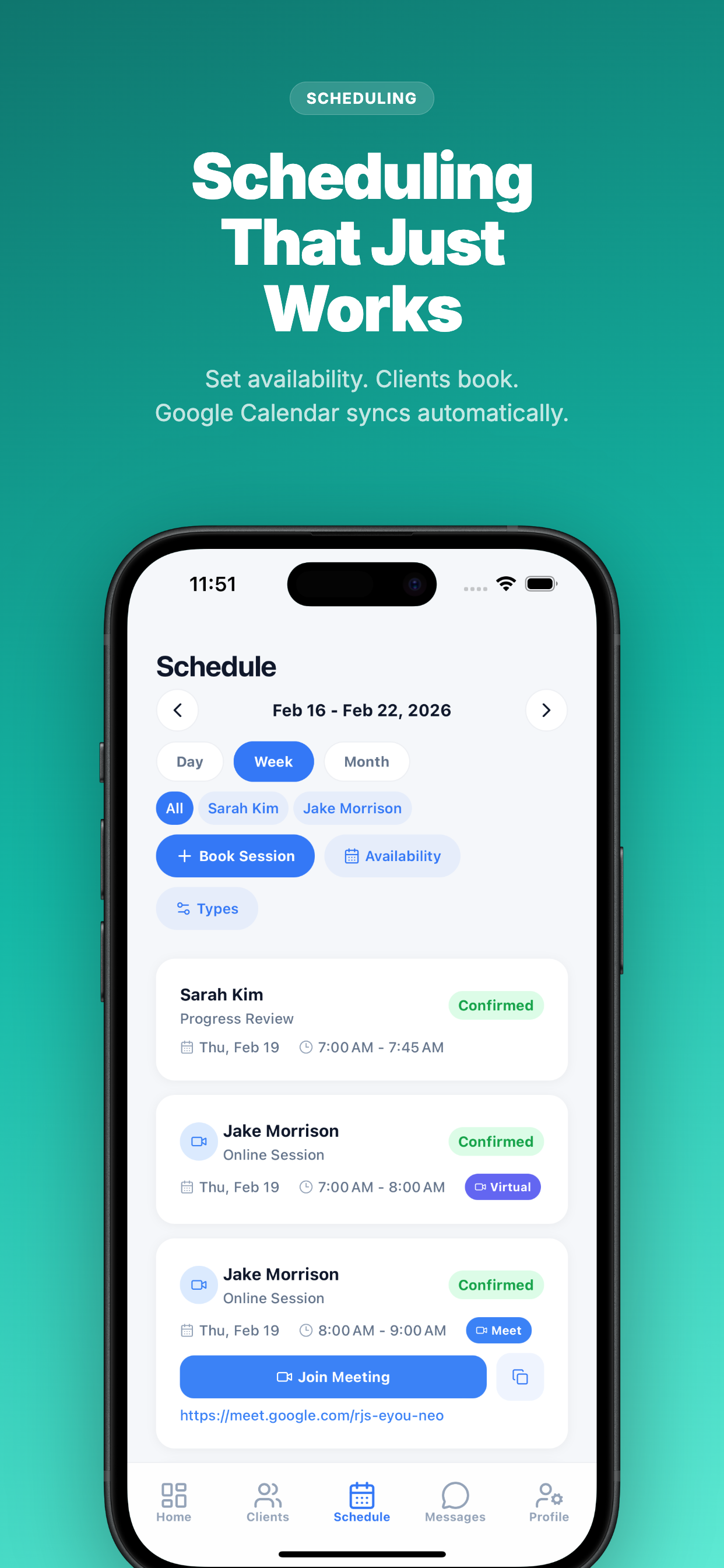
1. Schedule → Availability → set your weekly time slots → 2. Create appointment types (1-on-1, assessment, virtual session) → 3. Connect Google Calendar for bidirectional sync → 4. Clients see your open slots and book themselves. Auto-reminders go out 24hr and 1hr before. Google Meet links auto-generated for virtual sessions.
9. Ask Rep About Your Revenue (and Get Real Answers)
Most trainers can’t answer basic business questions: “What’s my MRR?” “Which acquisition channel is most profitable?” “How many clients have been with me longer than 6 months?”
With Rep, you just ask. It queries your real data — Stripe transactions, client records, subscription history — and gives you the answer in a visual stats card.
“How many active subscriptions do I have?”
“What’s my client retention rate?”
“Create a discount code for 20% off my starter package”
No spreadsheets. No Stripe dashboard digging. Just ask Rep.
10. Never Stare at a Blank Message Again
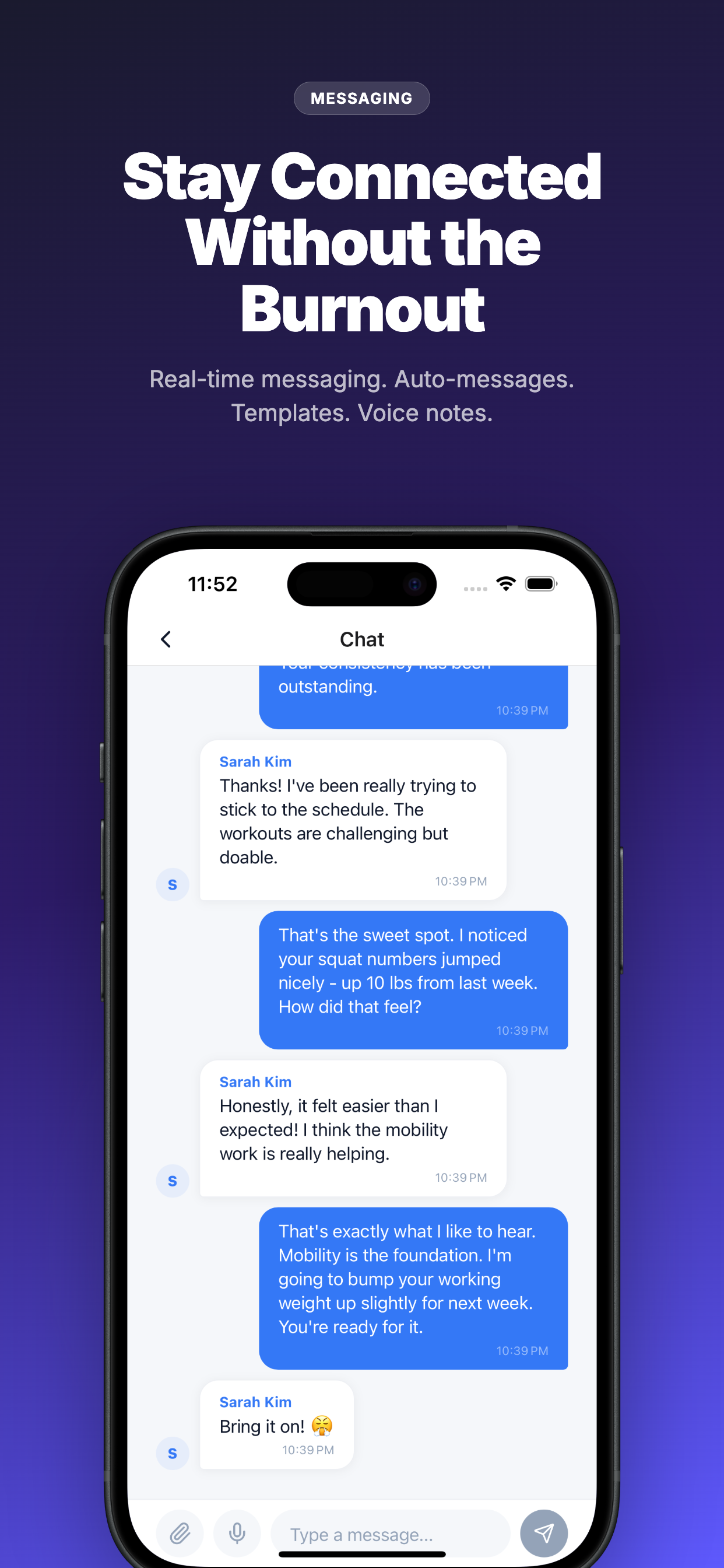
FirstRep includes pre-built message templates for every common coaching scenario: missed workout follow-up, great check-in response, welcome message, milestone celebration, re-engagement nudge, weekly motivation. One tap to select and send.
Or ask Rep: “Draft a message to Sarah congratulating her on her deadlift PR” and Rep writes a personalized message using her actual workout data. Review, edit if needed, send.
Your First Week on FirstRep: Day-by-Day Plan
Here’s exactly what to do in your first 7 days. Total time investment: about 2–3 hours. Time saved going forward: 5–10 hours every week.
Create your free account. Complete your trainer profile: photo, bio, specialties, certifications. Claim your handle (firstrep.fit/@yourname). Invite your first 1–3 clients. Time: 15 minutes.
Open the AI Builder. Describe a program you’d normally spend 45 minutes writing. Review it, adjust exercises, assign it to a client. Feel the time difference. Time: 10 minutes.
Create 3 rules: missed workout follow-up, weekly check-in reminder, welcome message. These run forever once set up. Time: 10 minutes.
Growth tab → Articles → Generate. Pick a topic in your specialty. Edit to add your voice. Publish to your mini-website. Time: 20 minutes.
Open the AI Agent. Ask “Show me my clients” or “Create a social post about nutrition myths.” Explore what 117 tools can do. Time: 15 minutes.
Add your availability slots, create appointment types, connect Google Calendar. Share your booking link. Time: 10 minutes.
Growth tab → Lead Magnets → Generate a free workout guide PDF. Set up a 3-email nurture sequence. Start capturing leads. Time: 20 minutes.
You now have: AI-generated workout programs, automated client follow-ups, a published blog post, a live mini-website with a lead magnet, a scheduling page, and an AI assistant that knows your entire business. Total setup time: ~2 hours. Time saved every week going forward: 5–10 hours.
Frequently Asked Questions
How can I use AI as a personal trainer?
With FirstRep, you use AI for workout programming (AI Builder generates programs from 1,734 exercises), content marketing (Growth tab creates articles and social posts), client automation (rules handle follow-ups and reminders), nutrition (AI recipes that hit exact macros), lead generation (mini-website + lead magnets + nurture emails), and business analytics (ask Rep about your revenue). All built in, all included on every plan.
Will AI replace personal trainers?
No. AI handles the administrative side — programming templates, content creation, data analysis, follow-up messages. It cannot provide accountability, emotional support, real-time form correction, or the nuanced coaching adjustments that come from knowing a client as a person. FirstRep is designed to make you a better, more efficient trainer — not to replace you.
What is the best AI tool for personal trainers?
FirstRep is the only platform that integrates AI workout programming, an AI coaching agent (117 tools), AI content generation, AI recipe creation, automation rules, and a full lead generation system into one app. Other platforms offer one or two of these features; FirstRep includes all of them on every plan including free.
Can I use ChatGPT instead?
ChatGPT is great for standalone tasks like writing captions or brainstorming ideas. But it can’t access your client data, assign workouts, send messages, or track revenue. With FirstRep’s Rep agent, you get ChatGPT-level intelligence that’s actually connected to your coaching platform. See our ChatGPT comparison guide →
How much does FirstRep cost?
Free for up to 3 clients with all features included. Pro is $19/month + $1.50/client above 8, which includes the AI Marketing Agent, priority marketplace ranking, and your mini-website. Every AI feature in this guide works on the free plan.
Is AI-generated workout programming safe?
Yes, because you always review before the client sees it. FirstRep shows an editable preview of every AI-generated program. You swap exercises, adjust volume, add coaching notes, and then assign. The AI is your drafting assistant; you’re the quality control.
Do I need technical skills?
If you can send a text message, you can use FirstRep’s AI. Type what you want in plain English and the AI handles the rest. No prompt engineering, no coding, no setup. The learning curve is about 30 minutes.
What is Rep (the AI coaching agent)?
Rep is FirstRep’s built-in AI assistant with 117 tools across 15 domains. Unlike ChatGPT, Rep can actually do things: create programs, send messages, check revenue, assign workouts, generate content, manage leads. It’s like having a virtual assistant who knows your entire business.
What to Read Next
This guide walked you through the 10 AI features in FirstRep. For deeper dives into specific workflows:
- AI Workout Programming — advanced program generation techniques
- AI Content Creation — building a content engine with the Growth tab
- AI Client Management — automation rules and risk detection deep dive
- AI Nutrition Planning — recipes, meal plans, and macro tracking
- ChatGPT vs. FirstRep — when to use each tool
- The Future of AI in Personal Training — what’s coming next
Or visit our AI for Personal Trainers hub for all guides and resources.
Free Resources for Coaches
Explore our library of free resources built for personal trainers and fitness coaches: